Known Issues
IMAP/POP3, ActiveSync and MAPI are not working, but the WebApp is accessible
The kopano groupware component requires a secondary licensing mechanism to be operational. To activate features like IMAP/POP3, ActiveSync, and MAPI, this licensing mechanism must be executed. For proper functionality, the subdomain designated for accessing the groupware, typically the mail subdomain, must be accessible from external networks. In some cases, the automatic procedure for activating the groupware license may not function correctly. If this occurs, you can manually trigger the process by executing the following command:
docker exec -it kopano lx-renew register
The output should look like the following
[root@manage ~]# docker exec -it kopano lx-renew register
2025/06/23 07:42:22 [INFO] loaded license: groupios.license
2025/06/23 07:42:23 [INFO] [mail.groupios.de] acme: Obtaining bundled SAN certificate given a CSR
2025/06/23 07:42:23 [INFO] [mail.groupios.de] AuthURL: https://acme-v1.e4a-licence.de/acme/e4a-lx/authz/ ...
2025/06/23 07:42:23 [INFO] [mail.groupios.de] acme: Could not find solver for: tls-alpn-01
2025/06/23 07:42:23 [INFO] [mail.groupios.de] acme: use http-01 solver
2025/06/23 07:42:23 [INFO] [mail.groupios.de] acme: Trying to solve HTTP-01
2025/06/23 07:42:23 [INFO] [mail.groupios.de] The server validated our request
2025/06/23 07:42:23 [INFO] [mail.groupios.de] acme: Validations succeeded; requesting certificates
2025/06/23 07:42:23 [INFO] [mail.groupios.de] Server responded with a certificate.
What if Outlook Autodiscover detects IMAP?
As part of the Simplified Account Creation process, Outlook performs a lookup against Microsoft services at prod-autodetect.outlookmobile.com. If you change providers, this service may show outdated but still cached values for the old provider. If this happens, select "Configure manually" and then select "Exchange" to properly autodetect the remaining setting for your mailbox.
Additional steps can be taken to avoid having to manually select the account type:
- Add the
HKEY_CURRENT_USER\Software\Microsoft\Office\16.0\Outlook\Setup\DisableAccountSettingsDetectionServiceas a DWORD value of 1. This disables the account detection service and goes straight to the account type dialogue box where the user has to select "Exchange". To automatically add the value to your registry, run this reg file. - Add
HKEY_CURRENT_USER\Software\Microsoft\Office\16.0\Outlook\Setup\DisableOffice365SimplifiedAccountCreationas DWORD value 1. This disables the simplified account creation and therefore the lookup of the Microsoft service. - Setting the A/AAAA records for the imap, pop and pop3 subdomains to 0.0.0.0 or :: will eventually invalidate the Microsoft service data.
No response when creating, updating
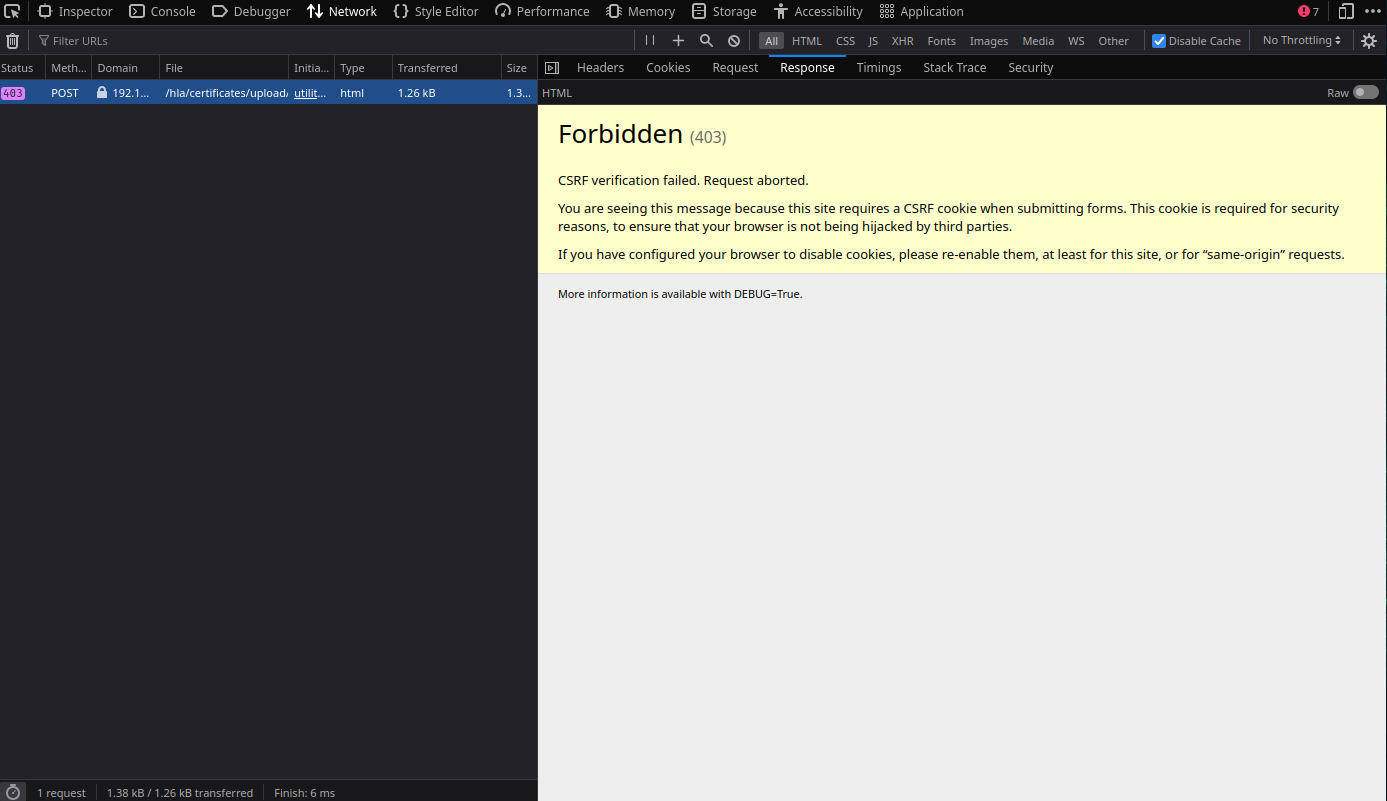
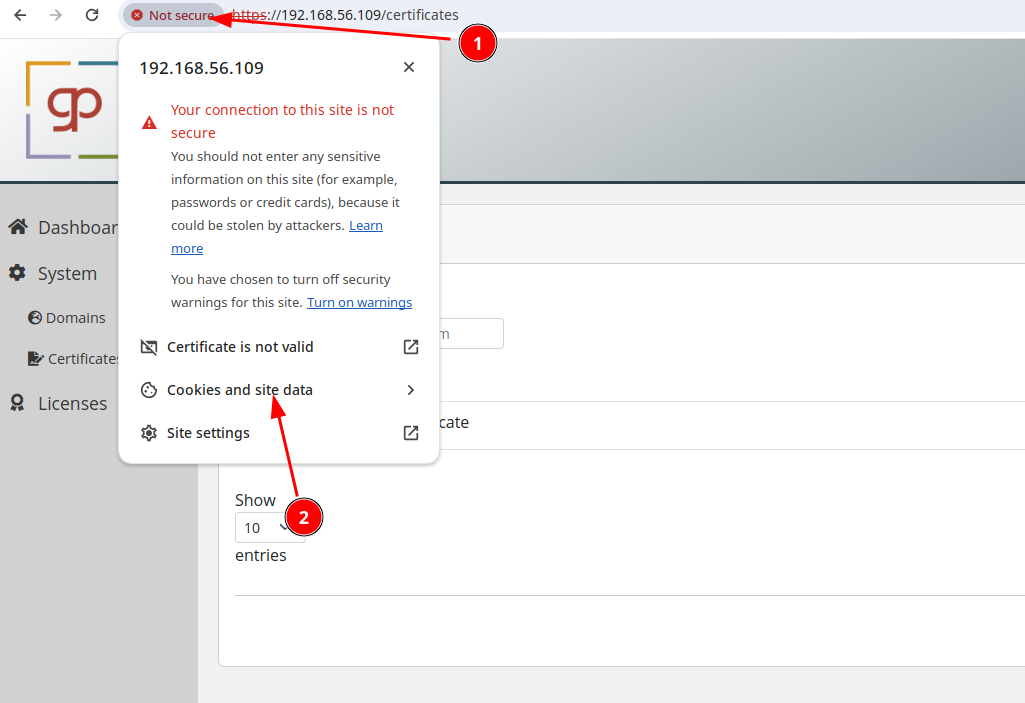
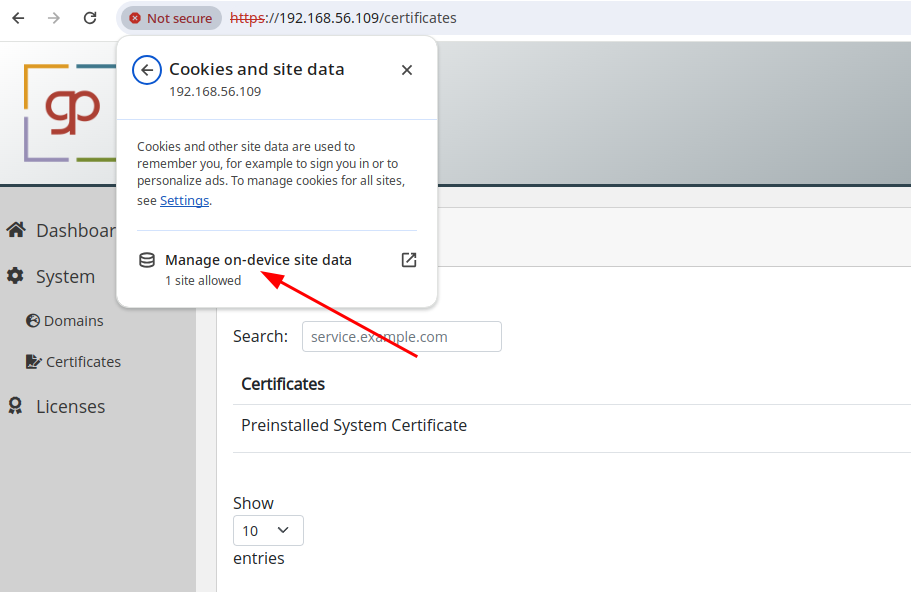
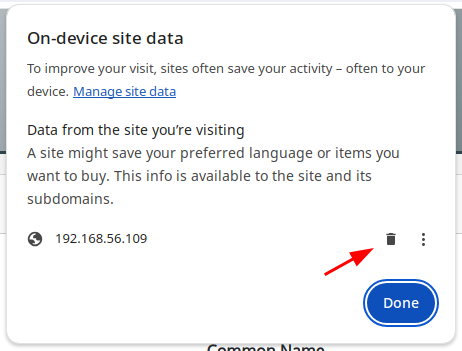
If you experience no response when creating a user or uploading a certificate and notice the following in the network tab of your browser's developer console, the solution is to clear cookies and remove website data. This issue often arises when using a virtual machine with snapshots, which can result in invalid cookies that are not immediately refreshed after restarting the virtual machine from a snapshot.
Remove Website Cookies and Site Data Chrome
Authorization Error during docker commands
Please follow these steps to ensure everything is set up correctly:
- Confirm that the license client is active and not displaying any errors.
- Check for the presence of the file
/home/groupios/secrets/docker_login. - Use the following command to manually log in to the Docker registry:
docker login -u $(cat /etc/machine-id) -p $(cat /home/groupios/secrets/docker_login) registry.groupios.com
Note
If you are unable to login manually please contact support@groupios.com.
I am getting midb out of memory during a migration, even though I have plenty of ram left
When running large migrations via IMAP it could be that internal buffers of midb are running full, which leads to the error message midb out of memory. To prevent this from happening the following settings can be adjusted temporarily.
docker exec -it kopano vi /storage/config.yaml
Add these keys and values (e4a should already exist, so only add imap):
e4a:
  imap:
    context_average_mem: 512K
    context_max_mem: 5M
docker kopano restart
Forcing Time Synchronization After VM Snapshot Rollback.
We use chrony for time synchronization.
After rolling back a snapshot, the system clock is often too far for e.g. certificates to be verified.
Use the following commands to force an immediate jump to the correct time.
As root,
- Verify valid sources are available:
chronyc sources - Verify the time is accurate:
chronyc tracking - Force the clock to jump immediately:
chronyc makestep - Validate the system time is correct:
date